Indication
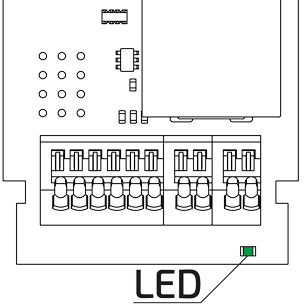
The Hall sensor and the LED indicator are used to detect the status of OrionMeter LA-IP, OrionMeter LA-IP [4O] devices - Green coloured LED
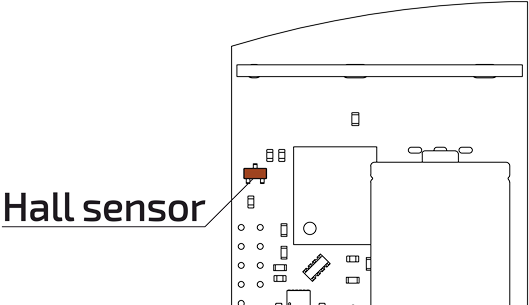
The main function of the Hall sensor is to detect a magnetic field when it is applied to the device. The sensor is installed on the upper left side of the device.
Also by applying a magnetic field to the Hall sensor it is possible to determine:
- successful activation of the device;
- registration status in LoRaWAN network;
- the confirmation that a DOWNLINK packet has been received;
- operating mode of the device.
Device status
To check the status, hold a magnet to the Hall sensor for 1-2 seconds:
| Number of blinks | Glow duration | Functional response |
|---|---|---|
| One blink | 300 ms | Device in ‘Warehouse’ mode |
| Two blinks | 300 ms 200 ms 120 ms | The device is activated but not connected to the LoRaWAN network |
| Three blinks | 300 ms 200 ms 120 ms 120 ms 120 ms | The device is activated and connected to the LoRaWAN network |
Switch to operating mode
To activate the device, hold a magnet to the Hall sensor for 10-20 seconds:
| Number of blinks | Glow duration | Functional response |
|---|---|---|
| Three blinks | 500 ms 80 ms 120 ms 80 ms 120 ms | Exit the device from the ‘Warehouse’ mode to the active mode |
Joining a LoRaWAN network
To repeat the procedure of joining the OTAA network by sending a Join Request packet and receiving a Join Accept packet over LoRaWAN, approach the magnet according to the following diagram:
Impact on the Hall sensor 5 seconds --> No impact 10 seconds --> Impact on the Hall sensor 5 seconds
| Number of blinks | Glow duration | Functional response |
|---|---|---|
| Two blinks | 250 ms 600 ms 250 ms | Immediately repeat the procedure of joining the OTAA network |
Operation in LoRaWAN network
The indication also allows you to see the success of receiving a packet from the Server:
| Number of blinks | Glow duration | Functional response |
|---|---|---|
| Two flashes | 120 ms 120 ms 120 ms | Received Join Accept packet over LoRaWAN |
| Three blinks | 120 ms 120 ms 120 ms 120 ms 120 ms | Successful application of settings obtained in Down Link package over LoRaWAN |
Urgent sending of an immediate data packet
If you need the device to send a current-time data packet, hold a magnet to the Hall sensor for 10-20 seconds:
| Number of blinks | Glow duration | Functional response |
|---|---|---|
| Two blinks | 120 ms 120 ms 120 ms | Device sending an instant data packet on an unscheduled data packet |
Service mode
When the device is switched to the service mode - FSK:
| Number of blinks | Glow duration | Functional response |
|---|---|---|
| Four blinks | 120 ms 120 ms 120 ms 120 ms 120 ms 120 ms 120 ms | FSK mode is activated |