ThingsBoard
The ThingsBoard integration forwards the data of an ONS application's devices to ThingsBoard over HTTP. For every uplink the server sends two POST requests to the ThingsBoard device HTTP API: attributes and telemetry. An ONS device is linked to its ThingsBoard device by an access token stored in a device variable. Data flows one way only: commands from ThingsBoard do not reach devices through this integration. The integration is set up on the application page of the web interface; an application can have one ThingsBoard integration.
How to connect
- In ThingsBoard, create a device and copy its access token (Access Token) from the device page.
- In ONS, open the card of this device in the "Nodes" section, on the "Node settings" tab switch to the "Advanced" mode and, in the "Variables" block, add the
ThingsBoardAccessTokenvariable with the token as its value, see Device token. - Repeat steps 1 and 2 for every device whose data you need in ThingsBoard.
- Open the application in the "Applications" section and, in the "Integrations" block, click "Add" on the ThingsBoard.io card.
- In the "Server" field, enter the ThingsBoard address, for example
https://thingsboard.example.com, see Integration fields. - Turn on the "Active" switch. It is off for a new integration, and the server does not start a disabled integration.
- Click "Save".
The "Integrations" block exists only on the page of an existing application: the add page does not have it. The card caption reads "The ThingsBoard.io integration forwards data to ThingsBoard.io HTTP.".
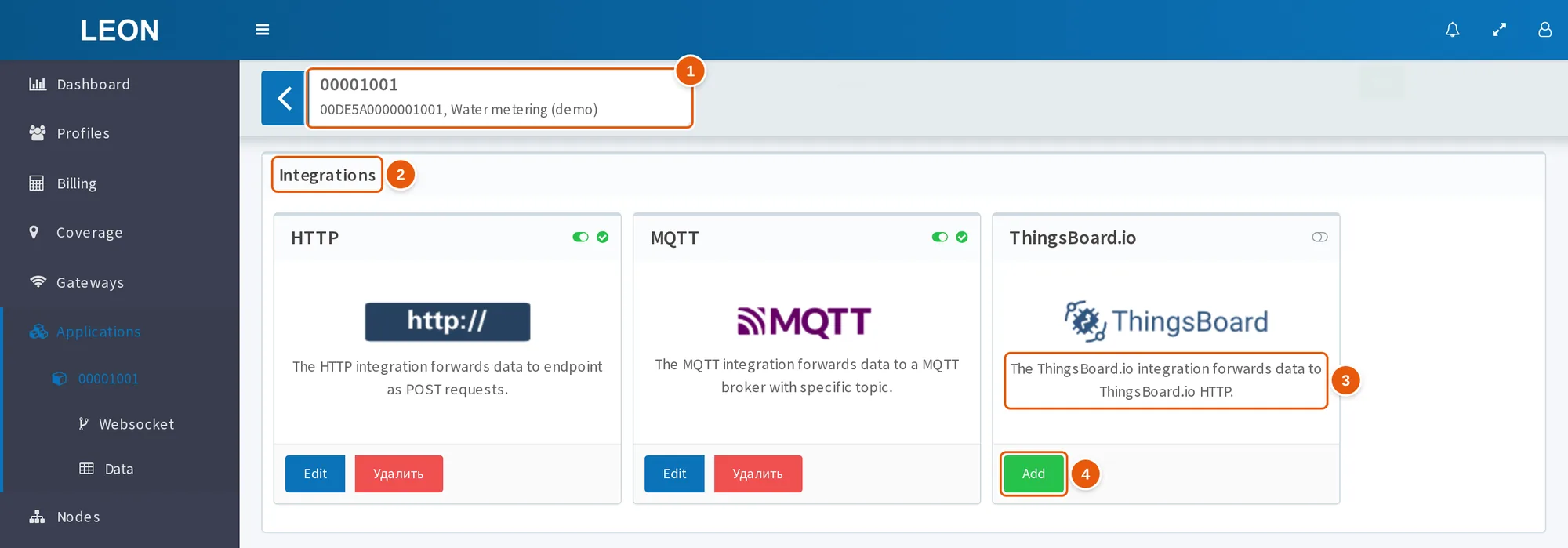
- Application page header — the App ID, App EUI and name of the application: the "Integrations" block exists only on the page of an existing application.
- Integrations — the block with the application's integration cards.
- The ThingsBoard.io card caption — "The ThingsBoard.io integration forwards data to ThingsBoard.io HTTP.".
- Add — opens the form of a new ThingsBoard integration. The button is shown while the application has no ThingsBoard integration.
The server applies saved settings immediately, without a restart: it restarts an active integration with the new configuration and stops a disabled or deleted one. To change the settings, click "Edit" on the card; to delete the integration, click "Удалить" (Delete).
Integration fields
| Field | What it sets |
|---|---|
| "Server" | Required. Base address of ThingsBoard: http:// or https://, the host and, if needed, a port and a path prefix — without /api/v1 and without a trailing /. For example, https://thingsboard.example.com |
| "Active" | Enables the integration. Off for a new integration |
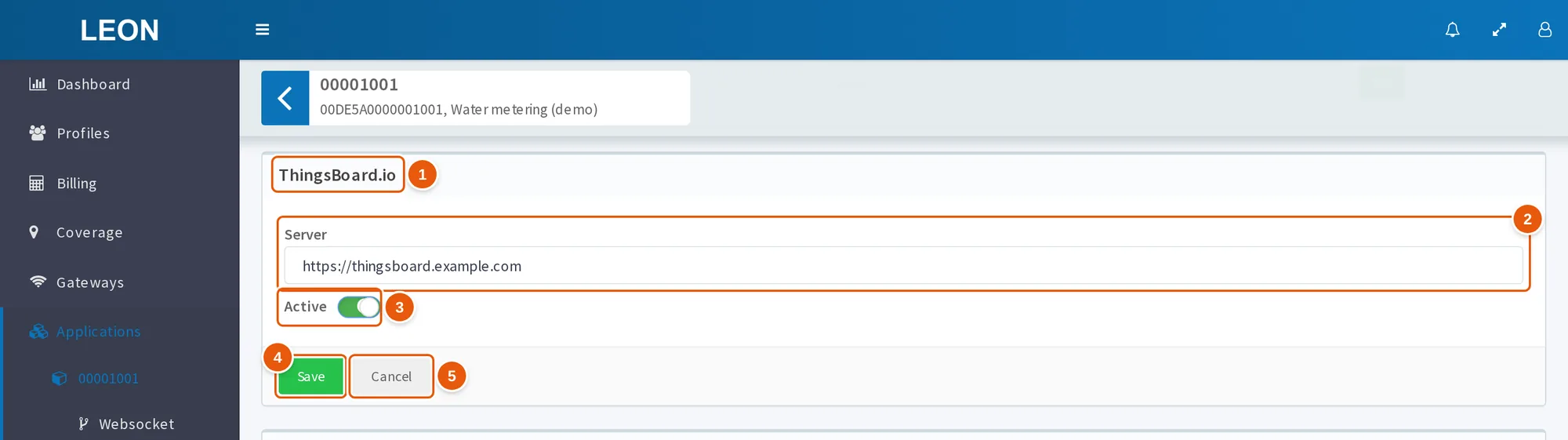
- ThingsBoard.io — while the form is open, the "Integrations" block title shows the integration name.
- Server — the base address of ThingsBoard, without
/api/v1and without a trailing/. - Active — enables the integration; off for a new integration.
- Save — saves the settings; the server applies them immediately.
- Cancel — closes the form without saving.
The server builds the request addresses by string substitution: <Server>/api/v1/<token>/attributes and <Server>/api/v1/<token>/telemetry. With "Server" set to https://thingsboard.example.com and the token my_device_token, attributes go to https://thingsboard.example.com/api/v1/my_device_token/attributes.
The form checks the "Server" field: the address must start with http:// or https:// and must not end with /. An empty field gives the error "Server URL is required"; an invalid address, including one with a trailing /, gives "Server URL must start with http:// or https://, e.g. http://example.com or https://example.com". On save, the server only checks that the field is present and is a string: it accepts an empty string. The form does not notice an extra /api/v1 in the address, and requests then go to …/api/v1/api/v1/….
Device token
ThingsBoard identifies the device by the token in the request address. The server takes the token from the ThingsBoardAccessToken device variable.
- The variable name is exactly
ThingsBoardAccessToken, case-sensitive. The server inserts the value into the address as is: it neither trims spaces nor encodes characters. - Where to set it. In the card of an existing device, in the "Advanced" mode, the "Variables" block — a table with the "Key", "Value" and "Action" columns and the "Add" and "Delete" buttons. A variable cannot be edited: delete it and add it again. The server does not allow adding a key the device already has: "Variable already exists.". The bulk "Change node settings" dialog has no variables — to set the token for many devices, use the REST API.
- When it takes effect. A new or changed token takes effect for uplinks received after the change; no restart is needed. Uplinks already waiting in the integration queue go out with the old token.
- A device without a token. If a device has no
ThingsBoardAccessTokenvariable, the server drops its uplink: nothing is sent to ThingsBoard. The record "ThingsBoardAccessToken not found in variables. Skipping data send." appears only in the service log; the web interface does not show it. This does not hold up the data of the application's other devices. - Who can see the token. The card shows variable values in plain text: anyone who can open the device sees the token. The token is part of the request address. The settings log records only the fact that variables changed, without the values.
- Shared with the codec settings. The application's JS codec receives the same variables as
input.variables; the Protocol 78 codec readsdeviceTypeandlanguagefrom them. The token and the codec settings live in one list of device variables.
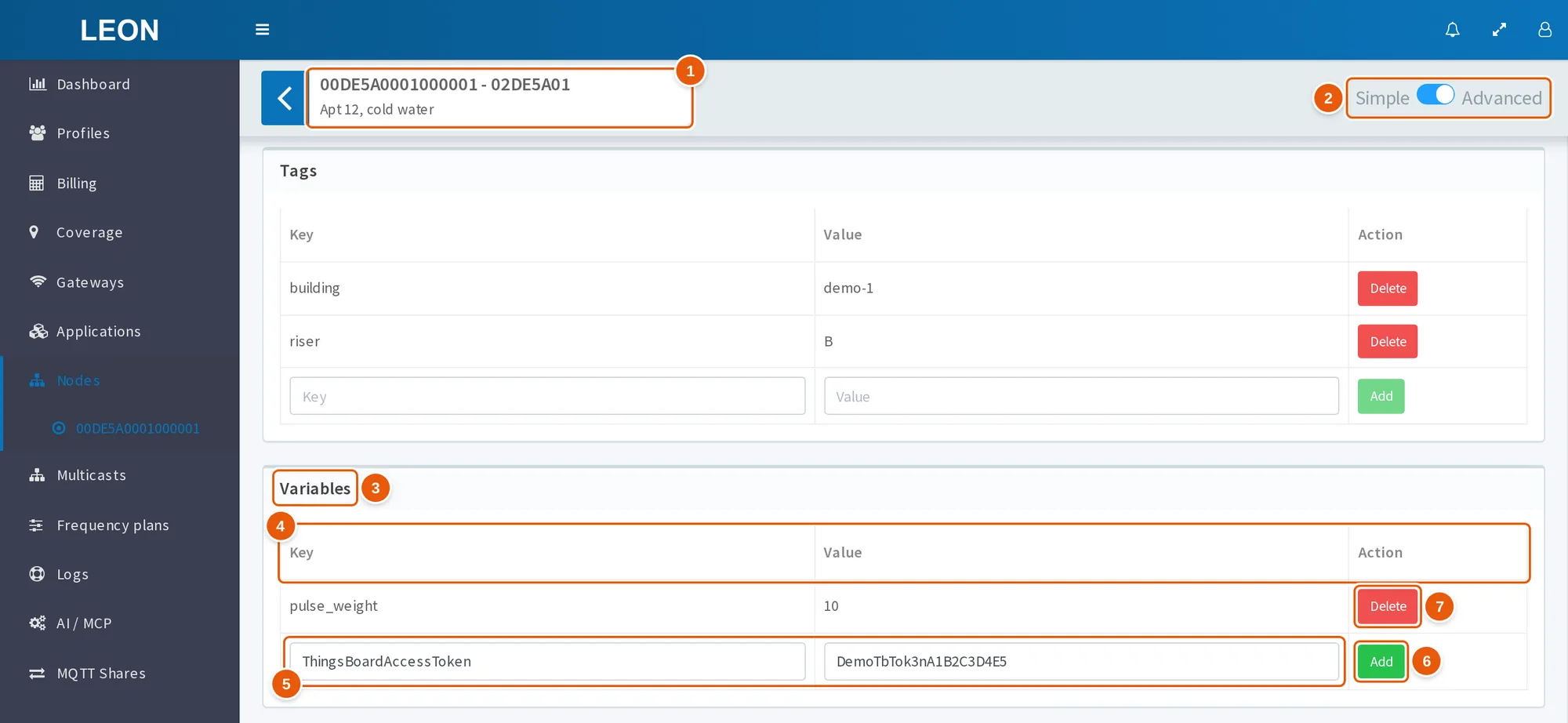
- Card header — the DevEUI, DevAddr and description of the device.
- Simple / Advanced — the mode switch on the "Node settings" tab; the "Variables" block exists only in the "Advanced" mode.
- Variables — the device variables block at the bottom of the tab, below the "Tags" block.
- Key, Value, Action — the table columns; values are shown in plain text.
- The add row — enter
ThingsBoardAccessTokenin the "Key" field and the ThingsBoard device token in the "Value" field. - Add — adds the variable right away; the card's "Save" button is not needed for this.
- Delete — deletes the variable after a confirmation. A variable cannot be edited: delete it and add it again.
Token over the REST API
Device variables are managed by the server REST API that the web interface uses. The address is <API base>/node/{DevEUI}/variables/, for active devices only. The API base depends on the deployment: /api/v1/, or /ons/api/v1/ if the web interface is served under the /ons/ prefix.
| Method | Body | What it does | Required permission |
|---|---|---|---|
GET | — | Returns the device variables as a dictionary | View node |
POST | {"ThingsBoardAccessToken": "<token>"} | Adds variables; one request can pass several | Change node |
DELETE | {"variable": "ThingsBoardAccessToken"} | Deletes the variable | Change node |
What the server sends
For every uplink the server sends two POST requests at the same time:
| Request | Address | Body |
|---|---|---|
| Attributes | <Server>/api/v1/<token>/attributes | See Attributes |
| Telemetry | <Server>/api/v1/<token>/telemetry | See Telemetry |
- Headers:
Content-Type: application/jsonandUser-Agent: OnsHTTPClient. The body is JSON. - The timeout of each request is 5 seconds.
- The server treats a response with code 400 or higher, a timeout and a connection error as a failure. What happens on failures is described in Delivery and retries.
- The server always verifies the TLS certificate, see "Good to know".
The integration receives only data uplinks — confirmed and unconfirmed (Confirmed and Unconfirmed Data Up). Joins and downlink frame statuses do not reach it.
Attributes
| Key | Value |
|---|---|
dev_eui | DevEUI of the device |
dev_addr | DevAddr of the device |
app_id | App ID of the application the device belongs to |
| Tags | Application and device tags: each tag is a separate key |
{
    "dev_eui": "6F1E570FFE14DBFC",
    "dev_addr": "78130AE1",
    "app_id": "77179F01",
    "building": "A"
}
- Tags are added after the three fields: first the application tags, then the device tags. A device tag overrides an application tag with the same key, and a tag named
dev_eui,dev_addrorapp_idoverrides the field with that name. - The server sends the attributes again with every uplink.
- According to the ThingsBoard documentation, a request to
/attributeswrites client-side attributes of the device.
Telemetry
| Key | Value |
|---|---|
battery_level | Battery level from the device's last answer to a status request (DevStatusAns): 0 — external power, 255 — the device cannot measure the level, otherwise — percent. null until the server receives such an answer |
margin | SNR margin from the same answer, dB, from −32 to 31. null until the server receives the answer |
join_request_time | Time of the device's last Join Request by the gateway clock. null if the server has not seen the device's activation |
data_… | JS codec data, see below |
The battery_level, margin and join_request_time fields are present in every request. They mean the same as the fields with the same names in the WebSocket API realtime_data message.
Codec data
Codec data gets into the telemetry only if the application has a JS codec and decodeUplink returned the data field. The server takes only data: the codec's errors and warnings are not sent to ThingsBoard. Without a JS codec, the telemetry contains only the three status fields.
The server flattens the data object into a set of keys:
- the key is the path from the root with the
dataprefix and the_separator; an array element gets its index in the path; - only leaf values whose full path contains the substring
valueare sent — in lowercase:rawValuedoes not match; - if a parent field name contains
value, for examplevalues, all values under it are sent.
data from decodeUplink | What goes to ThingsBoard |
|---|---|
{"temperature": {"value": 25.5, "unit": "C"}} | data_temperature_value: 25.5; unit is dropped |
{"sensors": {"temp": {"value": 22.0}}} | data_sensors_temp_value: 22.0 |
{"readings": [{"value": 1.0}, {"value": 2.0}]} | data_readings_0_value: 1.0, data_readings_1_value: 2.0 |
{"temperature": 21.5} | Nothing: the path has no value |
If a codec returns a flat object without value in the names, none of its data reaches ThingsBoard.
Example: a TWM uplink with the Protocol 78 codec
The application has the Protocol 78 JS codec, and the device has the variables deviceType = TWM, language = en and ThingsBoardAccessToken. The device sent the payload 782520125EC3732F04A8CD002D8101. The codec returned:
{
    "data": {
        "id": 120,
        "seq": 37,
        "language": "en",
        "device_type": "TWM",
        "flags": {
            "current_limited": { "value": false, "description": "current_limited" },
            "temperature_low": { "value": false, "description": "Low temperature" },
            "temperature_high": { "value": false, "description": "High temperature" },
            "tamper_magnet": { "value": false, "description": "Magnetic field sensor (TAMPER)" },
            "tamper_open": { "value": false, "description": "Tamper detected" },
            "time_need_update": { "value": true, "description": "Device time requires update" },
            "tamper_overlight": { "value": false, "description": "tamper_overlight" },
            "tamper_backflow": { "value": false, "description": "Reverse flow detected" }
        },
        "payloads": [
            {
                "shift": 15,
                "len": 12,
                "pid": "0x12",
                "sid": "Sensors",
                "direct": {
                    "initialization": false,
                    "ts": 1742800606000,
                    "timestamp": 1742800606,
                    "utctimestamp": "2025-03-24T07:16:46.000Z",
                    "alarms": [],
                    "temperature": { "rawValue": 205, "value": 20.5, "coefficient": 0.1, "unit": "°C" },
                    "humidity": { "rawValue": 385, "value": 38.5, "coefficient": 0.1, "unit": "%" }
                }
            }
        ]
    },
    "errors": [],
    "warnings": []
}
The telemetry request body:
{
    "data_flags_current_limited_value": false,
    "data_flags_temperature_low_value": false,
    "data_flags_temperature_high_value": false,
    "data_flags_tamper_magnet_value": false,
    "data_flags_tamper_open_value": false,
    "data_flags_time_need_update_value": true,
    "data_flags_tamper_overlight_value": false,
    "data_flags_tamper_backflow_value": false,
    "data_payloads_0_direct_temperature_value": 20.5,
    "data_payloads_0_direct_humidity_value": 38.5,
    "battery_level": 100.0,
    "join_request_time": "2026-10-01T06:12:40.114233Z",
    "margin": 9
}
- The codec returns flags as
{value, description}, so eightdata_flags_<flag>_valuekeys go to ThingsBoard. - The measurements are in
payloads[].direct: temperature and humidity arrive asdata_payloads_0_direct_temperature_valueanddata_payloads_0_direct_humidity_value. The payload index depends on its position in the frame: in a frame with several payloads, the same measurement gets a different key. - Not sent:
id,seq,language,device_type,description,shift,len,pid,sid,initialization,alarms,rawValue,coefficient,unitand the timestampsts,timestamp,utctimestamp.
To decode your own packet with the codec and see its JSON, use the Protocol 78 Playground.
Delivery and retries
- One successful request is enough. If at least one of the two requests succeeds, the server considers the uplink delivered. If the attributes went through and the telemetry did not, the telemetry of this uplink is lost.
- Both requests failed — a pause. The server returns the uplink to the queue and pauses the integration: it stops reading the queue, and the card icon shows Disconnected. The first pause is about 20 seconds, the next ones are 40, 80, 160 and 300 seconds, then 300 seconds each; up to 10% is added to each. After the pause the integration reads the queue again, and the first successful send resets the pause count.
- Uplinks go one at a time. The server sends the application's uplinks strictly one at a time and in queue order: the next one only after it has finished with the previous one. While ThingsBoard rejects both requests for one uplink — responds with code 400 or higher or does not respond within 5 seconds — sending to ThingsBoard stops for the whole application and resumes after pauses of up to 5 minutes. The uplinks of the other devices wait as well.
- A wrong token stops sending. According to the ThingsBoard documentation, ThingsBoard responds to a wrong token with code 401 to both requests. The server returns the uplink to the queue, and sending stops for the whole application. Fixing the variable does not help uplinks already in the queue: the token was written into them when they were received. Check the tokens before enabling the integration.
- While ThingsBoard is unavailable, uplinks accumulate. Each integration has its own queue on the server; by default neither the number of messages in it nor their lifetime is limited. After ThingsBoard recovers, the server sends the accumulated uplinks. By default the queue is deleted together with its data if nobody reads it for 14 days.
- Duplicates are possible. Delivery is "at least once": for example, if ThingsBoard accepted both requests but did not respond within 5 seconds, the server sends the uplink again.
State on the card
| Icon | What it means |
|---|---|
| No icon | The integration has not started yet |
| Connected, green | The integration is running and ready to send. It does not mean that ThingsBoard is reachable |
| Disconnected, yellow | The integration is not reading the queue. For an active integration — a pause after a send failure, see Delivery and retries |
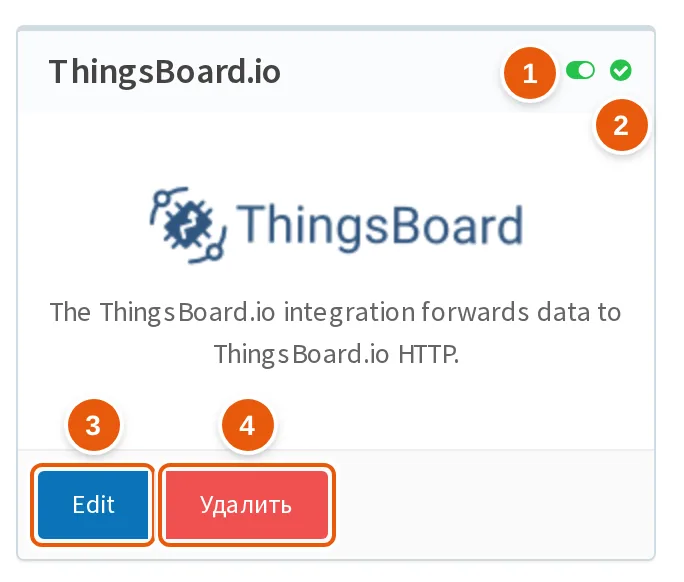
- The switch icon — green: the integration is enabled ("Active"); grey: disabled.
- The state icon — here Connected, green. Disconnected is yellow; an integration that has not started yet has no icon.
- Edit — opens the form with the current settings.
- Удалить (Delete) — deletes the integration after a confirmation.
The ThingsBoard integration never shows the Error state. It has no counters of successful and failed sends and no request history: whether the data arrived can be seen only in ThingsBoard.
Good to know
- There is no return channel. Commands and RPC from ThingsBoard do not reach the device through this integration. To send a downlink to a device, use the MQTT integration or the WebSocket API.
- The time in ThingsBoard is the delivery time. Telemetry is sent without the
tsfield, and according to the ThingsBoard documentation ThingsBoard then assigns its own server time. Readings accumulated while ThingsBoard was unavailable arrive with the delivery time. Timestamps from the codec (ts,timestamp,utctimestampin Protocol 78) are not sent: their paths have novalue. - Reception parameters are not sent.
rssi,lsnr,datr,freq,fcnt,fport, the receiving gateway,packet_loss_rateand the raw payload bytes do not go to ThingsBoard. They are in the messages of the MQTT integration and in the WebSocket APIrealtime_datamessage. - A self-signed certificate will not work. The server always verifies the TLS certificate, and the integration has no setting to turn the check off. ThingsBoard with a self-signed certificate cannot be connected over
https://. - "Accessible apps" add uplinks of other applications. The integration also receives the uplinks of the applications selected in the "Accessible apps" field of its application. For such uplinks,
app_idin the attributes is the App ID of the source application, and the token is taken from the variables of the source application's device. - After disabling or deleting, the accumulated uplinks go out on re-enabling. Disabling ("Active") and deleting stop reading the queue, but the server does not delete the ThingsBoard integration's queue. Uplinks accumulated while the integration was disabled go to ThingsBoard when it is enabled again, if it was disabled for less than 14 days. If the integration is deleted and created again within 14 days, the uplinks accumulated since the deletion go to ThingsBoard.
- ThingsBoard may store digit-only strings as numbers. According to the ThingsBoard documentation, the
transport.json.type_cast_enabledparameter, enabled by default, converts string values of telemetry and attributes that look like numbers into numbers. A DevAddr or DevEUI made only of digits, for example26011234, may then be stored as a number, and leading zeros may be lost.
See also
- Applications — the "Integrations" block and the "Accessible apps" field.
- Nodes — device tags and variables.
- MQTT — an integration with downlink and full uplink data.
- Subscribe to real-time data — the
battery_level,marginandjoin_request_timefields. - Protocol 78 Playground — decoding a packet with the Protocol 78 codec.