Logs
The "Logs" screen shows the user action log: who added, changed or deleted a gateway, device or application, exported data or granted permissions. It is used to find out who registered a device or deleted an object. The screen is available only to users with the staff flag and shows records only after you request them for a selected period.
Who can see the section
The "Logs" menu item comes after "Frequency plans" and before "AI / MCP" and opens the screen at /logs. Only users with the staff flag see the item. The server adds this flag at login for a server administrator account. Other users do not see the item, and opening /logs directly redirects them to the login page /login.
The screen gets its records with a GET /api/logs/ request. The server checks access on its own as well: it answers this request only for server administrator accounts.
How to get records
The screen loads nothing when it opens. To see records:
- Set the filters — see the table below.
- Click "Get data from period". While the request is running, the button reads "Loading".
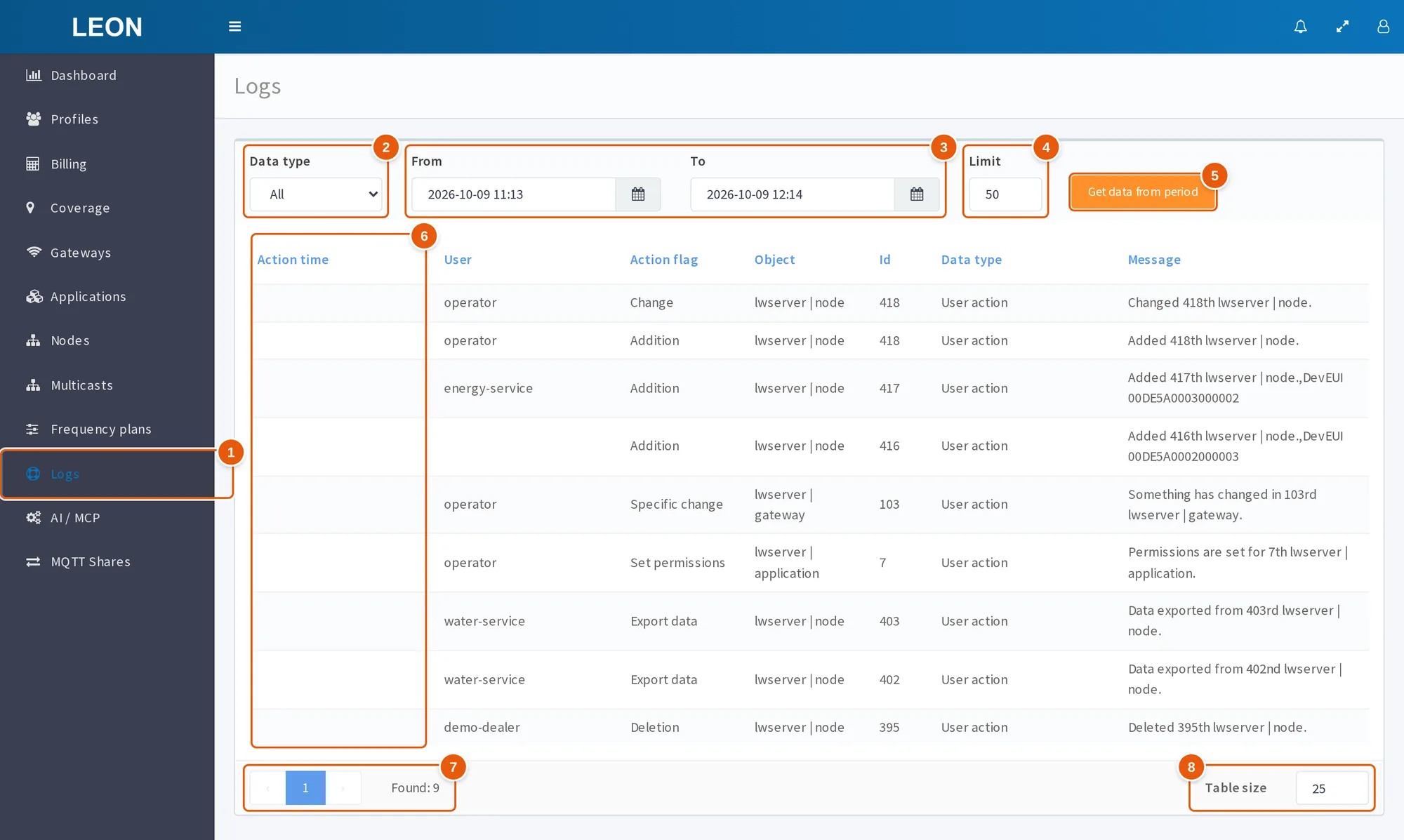
- Logs — the menu item between "Frequency plans" and "AI / MCP"; only users with the
staffflag see it. - Data type — "All" or "Users actions"; both options return the same records.
- From and To — the period in the
YYYY-MM-DD HH:mmformat in the browser's local time; by default from one hour before the screen was opened to one minute after. The bounds are exclusive. - Limit — how many of the newest records of the period the server returns, 50 by default.
- Get data from period — requests the records. The screen loads nothing when it opens.
- Action time — in the current version the column is empty, see Table columns.
- Pagination and Found — pages within the returned records and their number, never more than "Limit".
- Table size — rows per page, 25 by default.
| Filter | What it sets | Default |
|---|---|---|
| "Data type" | "All" or "Users actions". The server has only one data type, "User action", so both options return the same result | "All" |
| "From" | Start of the period in the YYYY-MM-DD HH:mm format | The time the screen was opened minus 1 hour |
| "To" | End of the period in the YYYY-MM-DD HH:mm format | The time the screen was opened plus 1 minute |
| "Limit" | How many of the newest records of the period the server returns | 50 |
The time in the "From" and "To" fields is entered in the browser's local time. Before sending, the interface converts it to UTC, and the server parses it as UTC. The bounds are exclusive: the result includes records strictly later than "From" and strictly earlier than "To".
The server sorts the records of the period by id in descending order and keeps the first N, where N is the "Limit" value. Paging works within these N records, and "Found" under the table shows their number.
Under the table there is pagination and the "Table size" field — the number of rows per page, 25 by default; the field's arrows do not go below 5. Switching to another page requests the server again.
If the request fails, an "Error" window with the text "Something went wrong" appears. If there are no records for the period, the table shows "List is empty". Right after the screen opens, until data is requested, the table also shows "List is empty".
Table columns
| Column | What it shows |
|---|---|
| "Action time" | The time of the action. In the current version the column is empty, see below |
| "User" | The account that performed the action |
| "Action flag" | The kind of action, see the table below |
| "Object" | The object type |
| "Id" | The object's internal primary key in the database — not a DevEUI or a gateway EUI |
| "Data type" | "User action" — the server has no other type |
| "Message" | The record text in English, see below |
Clicking a column header sorts the rows of the current page without a new request to the server.
The "Action time" column stays empty: the interface takes the time from the action_time field, while the server sends it in the time field. For the same reason, sorting by the "Action time" column does not work. The row order is set by the server: newest records on top.
"Action flag" values
The server composes the "Message" text at the time of writing from an English template.
| Code | "Action flag" | "Message" template |
|---|---|---|
| 1 | Addition | Added <id> <type>. |
| 2 | Change | Changed <id> <type>. |
| 3 | Deletion | Deleted <id> <type>. |
| 4 | Set permissions | Permissions are set for <id> <type>. |
| 5 | Export data | Data exported from <id> <type>. |
| 6 | Specific change | Something has changed in <id> <type>. |
<id> is the value from the "Id" column written as an English ordinal number, for example 12th. <type> is the object type. These templates have no Russian translation, so the messages stay in English in the Russian interface as well.
Which actions are logged
| Object | What is logged |
|---|---|
| Gateways | Creation — "Addition"; saving the form — "Change"; bulk deletion — "Deletion"; CSV export — "Export data"; granting permissions — "Set permissions"; "Update coverage" — "Specific change" |
| Devices (the "Nodes" section) | Creation — "Addition"; saving the form — "Change"; the "Change node settings" bulk change — "Change" for each device, only if the whole selection passed validation; deletion — "Deletion"; CSV export — "Export data"; granting permissions — "Set permissions" |
| Multicast groups | Creation, change and deletion. In the database a group is stored as a device, so its "Object" type is the same as for devices |
| Applications | Creation — "Addition"; change — "Change"; deletion — "Deletion"; granting permissions — "Set permissions". When an application is deleted, its devices are deactivated, but log rows are written only for the application itself |
| Profiles | Deletion only — "Deletion". Creating and editing a profile are not logged |
| Notifications | Creation — "Addition"; change — "Change" |
Devices created through the WebSocket API and MCP
A device created with the WebSocket API command create_device_req or with the ONS MCP tool create_devices also produces an "Addition" row in the log. The row is written in the same transaction as the device itself. Its message has two elements:
Added <id> <type>.— the object type and its number;<id>is written as an ordinal number, as in other records;DevEUI <DevEUI>— the DevEUI of the created device.
For rows created through MCP, the "User" column shows the account whose token MCP runs under. For rows from the WebSocket API the column is empty.
What is not logged
The log records actions in the web interface, as well as device creation through the WebSocket API and MCP.
Good to know
- "Limit" restricts the whole selection, not a page. The server returns at most N of the newest records of the period, and "Found" never exceeds the limit. If "Found" equals the limit, the period may contain earlier records too — raise the limit or narrow the period.
- If the "Limit" field is cleared, the interface sends
limit=nulland the server returns at most 10 records. The same applies to zero and to any value that is not a positive integer. AGET /api/logs/request without thelimitordata_typeparameter at all is not processed: the server returns an error. - In bulk operations — deletion and granting permissions — a log row is written for each selected object, including those where the operation was rejected for lack of permissions: for profiles the server answers "Not completely profiles deleted.", for gateways, devices and applications "Permission denied". A "Deletion" or "Set permissions" row does not prove that the operation was performed.
- The "Data type" filter does not affect the result: "All" and "Users actions" return the same records.
See also
- Profiles — user groups and the menu items they see.
- Applications — deleting an application and user permissions on applications.
- Create device — creating a device through the WebSocket API.
- WebSocket API — the interface for external systems.